


Food List Tracking & Shopping
3.1322.00 Reviews
App Specs
- Version
- 1.0.35
- Updated On
- License
- Free
- Downloads
- 100,000+
- Developer
- Brain Vault
- Categories
- Food & Drink
- Platform
- Android
Screenshots
 Analysis by AppCompare
I find a shared grocery list most useful when nobody in the household has a perfect picture of what is already in the cupboards. One person notices the last carton of milk is nearly gone, another is the one who shops, and the person cooking dinner may be someone else entirely. Food List Tracking & Shopping is aimed at bringing those small, easily lost details into one place, so a household can coordinate food supplies and shopping rather than relying on memory or a stream of messages.
When a shared list helps most
A realistic use for a multi-user food list is the ordinary midweek handoff: I notice we are low on rice while making dinner, add it to the shopping list, and my housemate can see it before heading to the store the next day. That is more dependable than sending a text that gets buried beneath other conversations. It can also help roommates who take turns shopping, or a couple who split cooking and errands. The useful change is not that shopping becomes complicated or automated; it is that one person’s observation can become a shared reminder.
I would use that shared workflow for recurring staples and immediate needs, while keeping unusual recipe ingredients tied to a specific meal plan in my own notes unless everyone needs to see them. A shared list can become noisy if every household member adds ideas without context. A quick detail such as “for Saturday dinner” or a sensible grouping can make an item easier to interpret, especially when the shopper did not add it. The app’s multi-user approach is most valuable when the people using it agree on a simple habit: add what is running low, and remove or update it when the errand is done.
Household boundaries and account expectations
Because the app asks users to create an account and is designed for shared use, I would decide who needs access before putting household information into it. A grocery list is not especially sensitive for most people, but it can reveal routines, food preferences, or what someone is planning to cook. I would keep the list focused on practical supplies rather than treating it as a private diary or a complete household record. If you share a device, it is also worth checking which account is active before making changes, so one person’s list edits do not get mixed up with another’s.
That boundary matters more in a home where several people use the same phone or tablet. A shared list works best when each person understands whether they are viewing the household’s common items or managing their own notes. I would not assume that a multi-user design automatically provides separate family profiles, permission levels, or parental controls. If your household needs strict separation between personal and shared lists, confirm that the available setup suits that arrangement before depending on it for everyday coordination.
Who will appreciate this approach
I think this kind of app is a better fit for people who repeatedly forget pantry basics, shop for more than one person, or want a practical place to keep food-related tasks together. It may be particularly helpful when the person who cooks is not the person who shops: the cook can record what is needed while the shopper checks the list at a convenient moment. It is less compelling for someone who buys only a few items at a time and already remembers them, or for a household that rarely shares shopping duties. In those cases, a note on the phone may be faster and easier.
It is also worth choosing the right level of structure. A single running list is quick to maintain, but it can be hard to scan if it contains pantry stock, planned meals, and urgent shopping all at once. I would separate these mentally or use whatever organization the app offers consistently: keep the shopping list for items to buy, and use pantry tracking for supplies already at home. This avoids a common inventory mistake—seeing an ingredient recorded somewhere and assuming it is available when it is actually on the shopping list.
Worth Reading Before You Choose

EA SPORTS FC Mobile 26 Is a Bigger Football Game, but It Takes Time

Flipboard Shows What News Apps Must Do Beyond the Feed

Switching to Android Auto Means Rethinking Your Driving Routine

Google Calendar Makes a Crowded Week Easier to Manage

Ludo King Makes the Most of the Minutes Between Plans

Baby Panda World Brings Quick Play to Modern Phones, but Its Game Library Feels Busy
If you want a full meal-planning system, automatic grocery delivery, or a tool that handles household permissions in detail, I would compare other options before settling on this one. Food List Tracking & Shopping is best judged as a food-supply and shopping organizer, not as a replacement for every kitchen or household app. Its appeal is the chance to keep essentials and errands connected without turning routine shopping into a project.
If you're anything like me, you know that grocery shopping can be a bit of a maze. There I am, juggling recipe ideas, trying to remember if I have enough eggs at home, and inevitably forgetting something crucial. Enter the Food List Tracking & Shopping app, a nifty little tool that's been a game-changer for my kitchen adventures.
Setting Up Shop
Getting started with the Food List Tracking & Shopping app is as straightforward as pie. Once you download it, the app prompts you to create an account. This step is super quick, and before you know it, you're ready to dive into organizing your grocery chaos.
The interface is clean and intuitive, which I totally appreciate. No one wants to wrestle with confusing menus when all you need is to know if you're out of milk! The home screen gives you a neat overview of your lists, recent purchases, and even suggests recipes based on what's already in your pantry. Talk about a lifesaver!
Building Your Food List
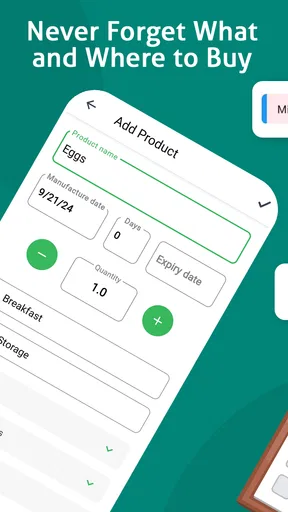
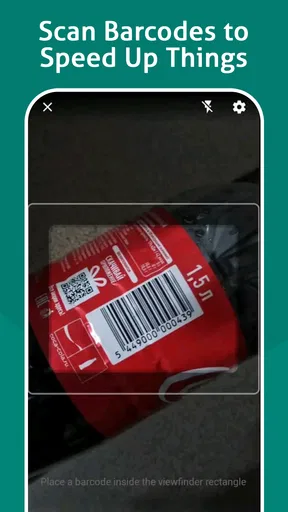
Creating a shopping list is as easy as tapping a few buttons. You can manually enter items, or the app lets you scan barcodes for lightning-fast additions. I found the barcode scanner to be surprisingly accurate, which is a major plus when you're in a rush.
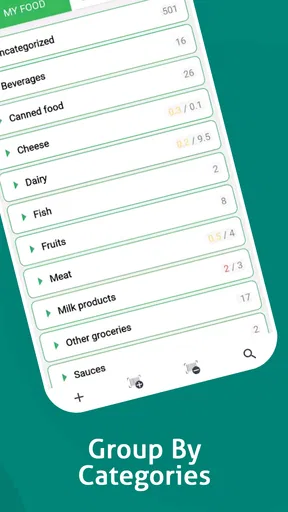
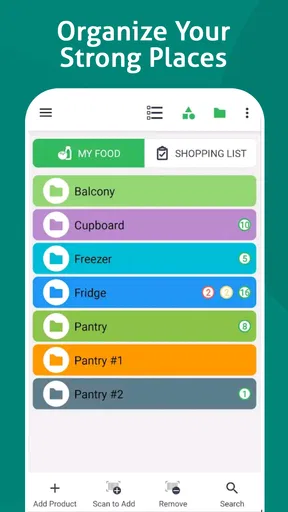
Another cool feature is the ability to categorize items. You can sort them by aisle, store, or even by recipes. This makes shopping trips quicker and more efficient because you can tackle one section of the store at a time.
Tracking Your Pantry
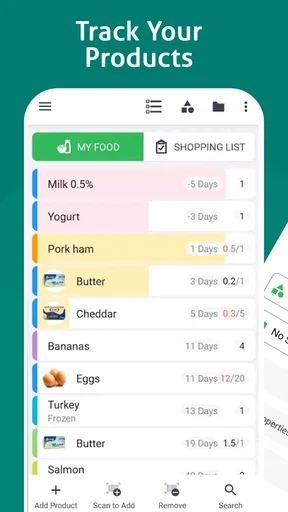
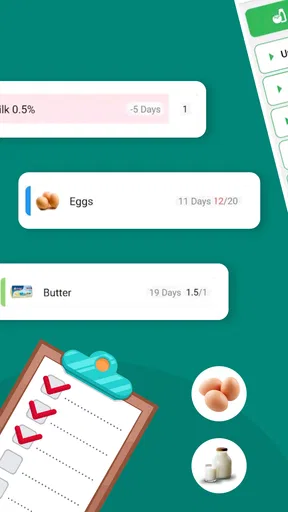
This app isn't just about shopping; it's about managing what you've already got. The pantry tracker keeps tabs on expiration dates and quantities, so you won't find yourself with a dozen cans of beans when you only needed one. The app sends you reminders about items nearing their expiry, which has saved me from a few culinary disasters.
Plus, the inventory feature is a dream for anyone who loves to meal prep. You can see at a glance what ingredients you have, which makes planning meals a breeze.
Shopping Made Smarter
One of my favorite features is the price comparison tool. Before heading out, you can check prices at local stores. This feature is golden for anyone trying to stick to a budget, as it helps you find the best deals around town.
Another handy tool is the ability to share lists. If you're like me and sometimes send your partner or a friend to grab a few things, this feature is a lifesaver. You can send the list directly to their phone, and they can update it in real-time as they shop.
Recipe Inspiration
Now, let's talk recipes. The app suggests dishes based on your current pantry contents, which has been a game-changer for nights when I have no idea what to cook. It's like having a personal chef whispering ideas in your ear, and I’m all for it.
The recipe suggestions are diverse, covering everything from quick snacks to elaborate dinners. You can also save your favorites for future reference, making meal planning even easier.
Making Shared Use Work in Practice
For a household, I would treat the shared list as a handoff tool rather than a place to document every kitchen decision. Before leaving for the store, the shopper can scan what is already at home and check the list; after shopping, items that have been bought should be marked or removed promptly. That small closing step matters. If completed items remain mixed in with things still needed, the next person may buy duplicates or waste time asking whether an item was handled.
A useful habit is to check pantry quantities before adding a bulk staple. If the remaining amount is enough for tonight but not for the next few meals, add a realistic quantity rather than simply recording the ingredient name. This makes the inventory more useful to someone who did not see the package in the cupboard. The trade-off is that quantity tracking takes attention: for a household that rarely updates its stock, a short shopping list may be more trustworthy than an ambitious inventory that quickly becomes stale.
Keeping the List Useful for Different Ages
The app is rated for Everyone, which makes its intended audience broad, but that does not replace household judgment about who should use an account or edit shared supplies. For a younger helper, I would keep the task simple—adding a requested item or checking what is needed—while an adult handles account setup and any purchase decisions. In a shared home, clear expectations also help prevent accidental edits: everyone should know whether removing an item means it was bought, is no longer needed, or was simply taken off the list.
Food tracking can be helpful, but it should not be treated as a guarantee that an item is safe to eat. Expiration reminders and recorded quantities depend on people entering accurate information and keeping it current. I would still check packaging and use ordinary food-safety judgment, especially when several people add or update pantry entries. The app can support household organization; it cannot replace checking the actual food.
Where It Sits Among Grocery Alternatives
Compared with a basic notes app, a dedicated food organizer has a clearer purpose: it can bring shopping, pantry awareness, and meal ideas into the same routine instead of leaving them scattered across separate notes. A paper list still wins for someone who prefers a quick, screen-free reminder, and a general shared task list may suit a household that needs groceries alongside chores and appointments. I would choose this app when food stock itself is the problem to solve, rather than merely needing somewhere to type a few errands.
Its wider feature set also creates a practical trade-off. Barcode entry, categories, pantry quantities, expiry reminders, price comparisons, and recipe suggestions can make the workflow richer, but only if those tools match how you actually shop. I would start with the simplest routine—record a few common staples and maintain one shopping list—then add more tracking only if it saves time. Trying to build a perfect catalog of every cupboard item on day one is likely to feel like work instead of help.
Cost, Compatibility, and Day-to-Day Fit
Food List Tracking & Shopping is a free app from Brain Vault, with in-app purchases ranging from $4.99 to $59.00 per item. I would begin with the free experience and decide whether any paid option is worthwhile only after the core list-and-pantry routine has proved useful at home. The app’s current version is 1.0.35, and it requires Android 7.0 or later, so checking the device’s operating system before planning a household setup is a sensible first step.
Its average rating is 3.1 from around five thousand ratings, and it has more than one hundred thousand installs, which gives a prospective user a reason to approach it with measured expectations rather than assume it will suit every workflow. Those figures do not tell me whether the app fits a particular household; the practical test is whether everyone can keep the list current without finding it more effort than a shared note. It is free to try, so I would test the routine with a small set of regular groceries before relying on it for a full pantry.
My Household Verdict
For me, the strongest case is a home where grocery responsibility moves between people and forgotten staples cause repeat trips or duplicate purchases. The shared approach can make those handoffs clearer, while pantry tracking gives meal planning a more realistic starting point. I would skip it if my needs were limited to a short list, if nobody else would update the shared information, or if I needed detailed account boundaries that the household could not establish in its setup.
All in all, the Food List Tracking & Shopping app is a must-have for anyone looking to streamline their grocery shopping and pantry management. It's user-friendly, packed with useful features, and genuinely makes life easier. Whether you're a culinary wizard or just trying to get by without forgetting the bread, this app has got you covered.
So, if you're ready to take control of your grocery game, give this app a try. You might just find yourself wondering how you ever got by without it!
Pros
- User-friendly interface simplifies shopping.
- Customizable lists for personalized needs.
- Barcode scanner for quick item entry.
- Syncs across devices for family sharing.
- Offline mode available for no internet areas.
Cons
- Limited recipe integration options.
- Ads can be intrusive at times.
- No voice command support for hands-free use.
- Some features locked behind paywall.
- Occasional sync issues with shared lists.
FAQs for Food List Tracking & Shopping
What features does the Food List Tracking & Shopping app offer?
The app provides a comprehensive suite of features designed to streamline your grocery shopping experience. It includes customizable shopping lists, barcode scanning for easy item addition, real-time price comparisons, and inventory tracking to prevent overbuying. The app also offers meal planning suggestions based on your inventory and dietary preferences.
Can I use the app offline, and will my data sync across devices?
Yes, the Food List Tracking & Shopping app offers offline functionality, allowing you to access and update your lists without an internet connection. Once you're back online, the app will automatically sync your data across all devices linked to your account, ensuring seamless access and updates.
Is the app compatible with both Android and iOS platforms?
Absolutely, the Food List Tracking & Shopping app is available for download on both Android and iOS devices. This ensures that you can enjoy its features regardless of your smartphone's operating system. Regular updates are released for both platforms to enhance performance and introduce new functionalities.
How does the app ensure data security and user privacy?
The app employs robust encryption protocols to protect your personal data and shopping history. User privacy is a top priority, and the app adheres to strict data protection standards. Additionally, you have the option to enable two-factor authentication for an extra layer of security when accessing your account.
Are there any subscription fees or in-app purchases?
The app is free to download and offers a basic set of features at no cost. However, for advanced functionalities like meal planning suggestions and real-time price comparisons, a premium subscription is available. In-app purchases are also offered for additional features, ensuring flexibility based on user needs.


